

In today’s rapidly advancing digital age, healthcare communication is evolving to ensure accessibility for all patients, regardless of their abilities. One of the most significant breakthroughs in this area is the integration of Text-to-Speech (TTS) AI technologies, which provide a powerful tool for enhancing communication in healthcare settings. This blog explores how TTS AI improves accessibility in healthcare communication and highlights the capabilities of CapCut Desktop Video Editor, specifically its Text-to-Speech feature, to empower healthcare professionals.
The Importance of Accessibility in Healthcare
Healthcare access is a fundamental right, yet many patients still need help understanding barriers that can lead to misunderstandings and inadequate care. The World Health Organization (WHO) emphasizes the importance of effective communication in promoting health literacy, which directly affects health outcomes. For instance, patients with limited English proficiency may need help understanding medical advice if it is solely provided in writing. TTS AI can bridge this gap, allowing patients to hear critical information in their preferred language or format.
Enhancing Communication for Diverse Audiences
Healthcare providers serve a diverse population, including individuals who speak different languages, those with varying literacy levels, and patients with visual impairments. Text-to-speech AI enables healthcare professionals to create audio versions of written content, making it more accessible to those struggling to read. For example, a patient brochure detailing medication instructions can be transformed into an audio format, allowing patients to listen and understand the information better.
Improving Patient Engagement
Engaged patients are more likely to follow medical advice, attend follow-up appointments, and manage their health effectively. TTS technology can facilitate this engagement by providing patients with easily digestible audio content. By incorporating TTS in patient education materials, healthcare providers can foster a more interactive and inclusive environment, encouraging patients to participate actively in their care.
Supporting Individuals with Disabilities
According to the World Health Organization, over a billion people live with some form of disability, and many face significant barriers to accessing healthcare information. TTS AI plays a crucial role in breaking down these barriers by providing an alternative means of receiving information. For example, patients with visual impairments can benefit from audio content that conveys essential health information, enabling them to make informed decisions about their care.
Streamlining Communication in Telehealth
The rise of telehealth has made healthcare more accessible, but it also presents unique communication challenges. TTS AI can enhance telehealth interactions by providing real-time audio feedback for written communication, ensuring that healthcare providers and patients are on the same page. This is particularly useful when discussing treatment plans or providing instructions that may be complex or difficult to articulate.
CapCut Desktop Video Editor: Text-to-Speech AI Feature
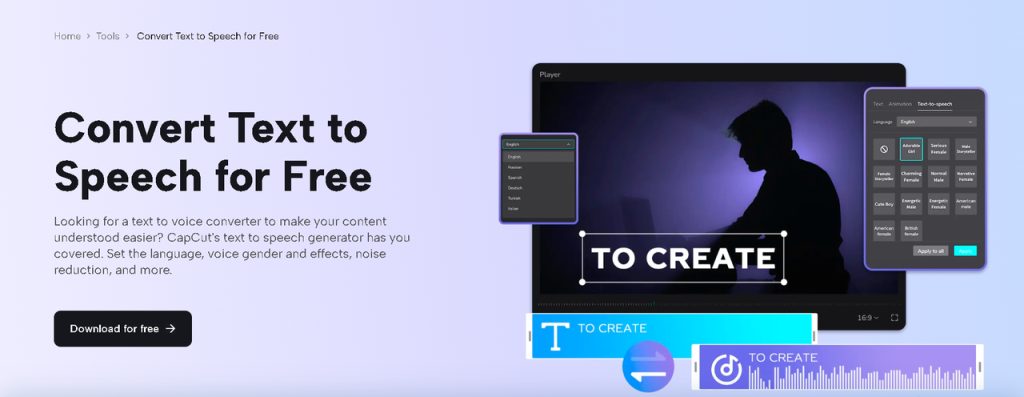
CapCut, a versatile video editing software, offers a powerful Text-to-Speech feature that can significantly enhance communication within healthcare settings. With CapCut video editor for PC, healthcare providers can create engaging, informative, and accessible patient content. This includes instructional videos, informative presentations, and personalized health messages.
Key Features of CapCut’s Text-to-Speech AI
-
Multiple Voice Options: CapCut offers a variety of voice options, allowing users to select the most suitable voice for their target audience. This flexibility ensures that the content feels more personalized and relatable.
-
Customizable Speech Rate and Pitch: Users can adjust the speed and tone of speech, ensuring clarity and enhancing understanding, especially for patients with different processing speeds.
-
Supports Multiple Languages: This feature allows healthcare professionals to reach a diverse patient population by providing content in various languages, thereby improving inclusivity.
Using CapCut’s Text-to-Speech AI Feature
CapCut’s Desktop Video Editor offers an intuitive TTS AI feature that empowers healthcare professionals to create engaging audio content quickly and easily. Follow these steps on how to use the Text-to-Speech AI feature for your video:
Step 1: Create a New Project
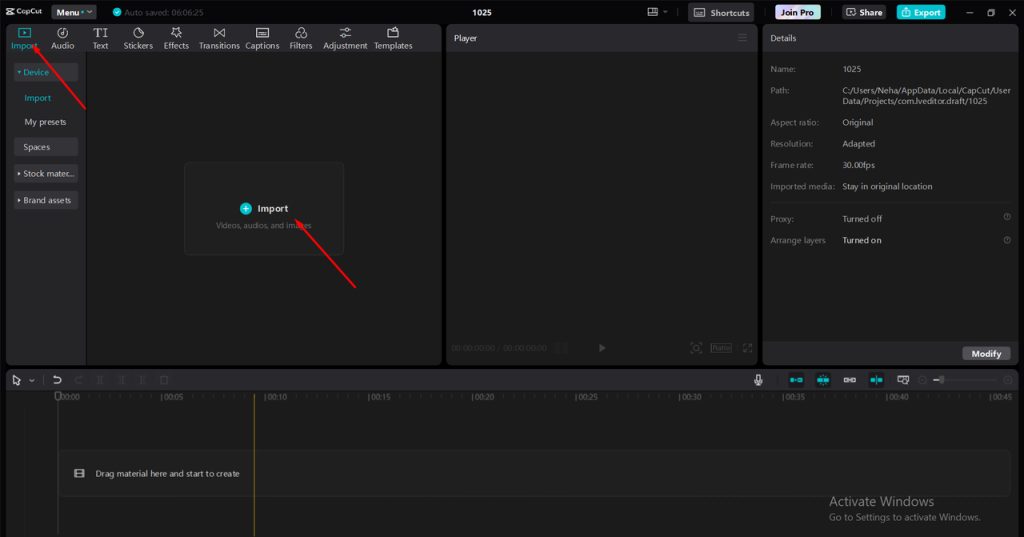
Download and install CapCut Desktop Video Editor and create a new project. You can start by importing any video or image content you want to accompany your audio. This is particularly useful if you are creating educational videos for patients.
Step 2: Convert Text to Speech
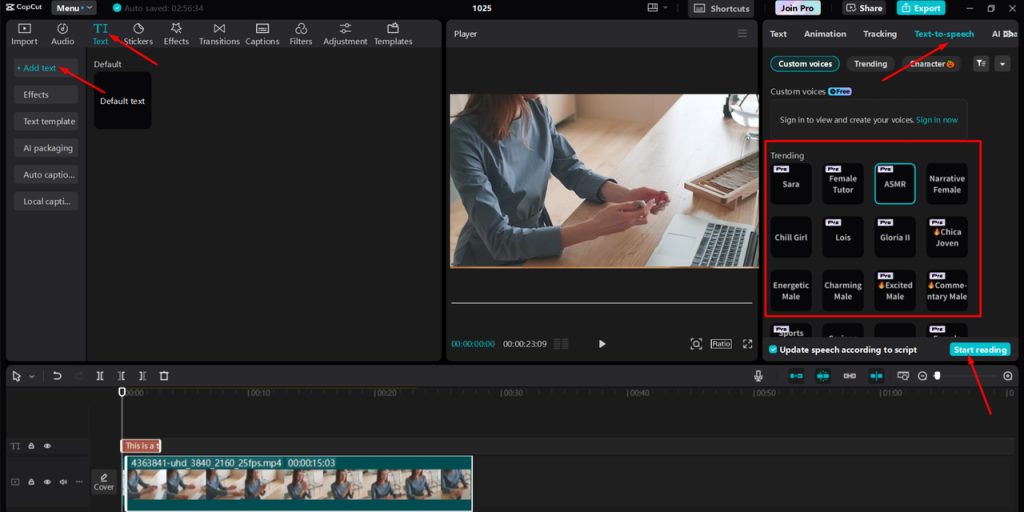
In the main editing interface, locate the Text tool in the toolbar. Open it to access the text editing options. You can type your text directly into CapCut or import a text file containing the information you want to convert to speech.
Once your content is ready, select the TTS option. After selecting your preferred voice, click Convert or Generate. The software will process the text and create an audio version.
After generating the audio, you can adjust the voice’s volume, speed, and pitch to ensure it meets your communication needs. You can also refine your video using CapCut Desktop Video Editor and other tools, such as Background Remover.
Step 3: Export Your Project
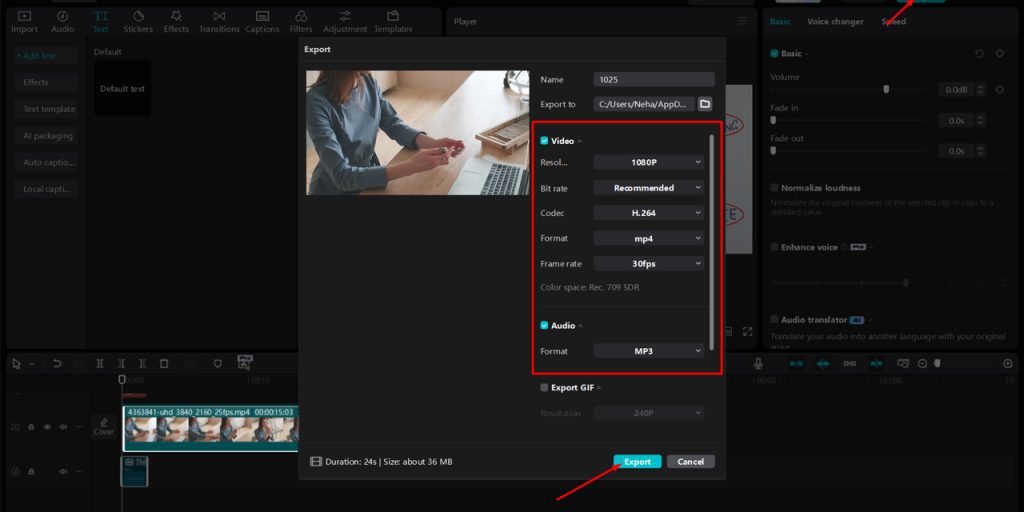
Once you are satisfied with the audio and visual synchronization, it’s time to export your project. Click the Export button, choose your preferred file format, and save it. Your audio-visual content can be shared with patients or used in educational settings.
 Conclusion
 Conclusion
As healthcare continues to evolve, leveraging technology like Text-to-Speech AI is essential in promoting effective communication. CapCut’s Desktop Video Editor offers an accessible and powerful TTS feature that can significantly enhance the delivery of health information to diverse patient populations. By breaking down barriers and improving accessibility, TTS AI is crucial in fostering better health outcomes and ensuring that all patients receive the information they need to make informed decisions about their care.