You need original b-roll for your next video. Stock footage doesn’t match the scene. Hiring a videographer costs $400 minimum — more than the video will ever earn. You either ship something that looks generic, or you delay another week.
Generating footage from a text description is now a real option, not a workaround. Tools like Free Veo 3 on VeoE AI let you produce cinematic video clips with native audio from a plain English description — 100 free credits on sign-up, 100 more every week, no subscription required. This article covers exactly what the platform offers and how to get your first usable clip in under 10 minutes.
Why YouTube Creators Still Struggle to Get Original Footage
Getting usable, original footage at a weekly publishing cadence runs into the same three walls:
- Stock footage is overused. The most usable clips from Storyblocks or Shutterstock appear across thousands of channels. Regular viewers recognize them instantly — and familiar footage reads as filler, not production value.
- Shooting original video is expensive. A single filming day — camera rental, location, editing time — runs $300–$800 for a solo creator. That budget only works for hero content, not weekly uploads.
- Earlier AI video tools generated silent clips. That meant a separate workflow: source music, record sound effects, sync in post. For a creator already juggling scripting, filming, and editing, that extra pipeline wasn’t worth it.
What VeoE Veo 3 Actually Lets You Do
VeoE AI wraps Google’s Veo 3 model in a four-tool platform. Each tool solves a specific part of the video production problem that solo creators run into most.
Core Video Generation
Text to Video is the main engine. You describe a scene — subject, camera angle, lighting, motion style, mood, audio — and Veo 3 renders a cinematic clip with native synchronized audio in under 60 seconds. The audio isn’t added separately: if you describe rain, the clip generates rain sound in sync with the visual. If your scene includes a spokesperson, dialogue is generated with lip-sync. For YouTube creators, this replaces stock b-roll for establishing shots, transitions, product visuals, and atmospheric cutaways — all generated to your exact specs rather than approximated from a library.
Image to Video solves a different problem. If you already have a product photo, a portrait, or a branded graphic, you upload it and animate it. A flat product shot becomes a slow cinematic reveal. A landscape photograph gains wind movement and ambient audio. Useful for creators who have existing visual assets but need motion to make them work in video.
AI Video Agent at veoe chat removes the prompt-writing barrier entirely. Instead of learning how to structure a Veo 3 prompt, you describe your idea in plain conversation — “I need a product demo for a coffee brand, warm lighting, no people” — and the agent writes the optimized prompt, generates the clip, and refines it based on your feedback. Say “make it slower” or “add more steam from the cup” and it adjusts without starting over.
Prompt and Asset Tools
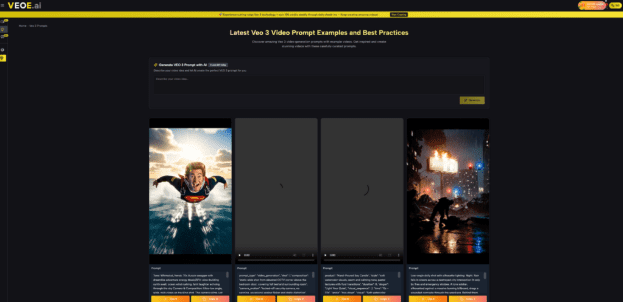
- Veo 3 Prompt Hub is a curated library of tested prompts with real generated output shown alongside each one. You browse finished clips — cinematic action sequences, product demos, documentary-style shots, atmospheric scenes — and click Use to generate in the same style. For new users, this removes all guesswork: you see exactly what a prompt produces before committing any credits.
- Video Asset Management organizes every clip you generate automatically by session, so you’re not manually downloading and renaming files between editing sessions.
All four tools are accessible from one account with no switching between platforms. One practical limitation: clips generate at around 8 seconds each. For longer sequences, you’ll build from multiple clips — which is standard YouTube b-roll practice, and the asset management tool makes that assembly straightforward.
How to Get Your First Clip in Under 10 Minutes
No installation. No credit card. Go to veoe Veo 3 video and follow these steps.
Step 1 — Claim Your Free Credits
Sign up with an email to unlock 100 starting credits. Credits refresh by 100 every week automatically — no plan required.
Step 2 — Write or Browse Your Prompt
Either describe your scene directly in the prompt field, or open the Prompt Hub at veoe.ai/veo-3-prompt to find a tested template. Include subject, camera style, lighting, mood, and audio in your description — the more specific, the more usable the output.
Step 3 — Generate and Compare Variations
Hit Generate. Your clip is ready in under 60 seconds. Run 2–3 variations before committing — small wording changes produce meaningfully different results each time.
Step 4 — Download and Drop Into Your Edit
Export directly and import into Premiere, DaVinci Resolve, or CapCut. Audio is already embedded — no separate sync step needed.
FAQ
Is VeoE AI actually free, or does the credit system hit a paywall quickly?
100 credits on sign-up plus 100 per week, no payment required. Each generation costs roughly 10 credits, so the free tier covers 10+ clips per week consistently.
Can I use VeoE AI-generated clips commercially on YouTube and in paid ads?
Yes. Full commercial use rights are included with every generated clip — no attribution, no per-use fees, no licensing restrictions.
How does VeoE AI differ from accessing Veo 3 directly through Google?
Google’s direct Veo 3 access requires a Gemini Ultra subscription. VeoE AI provides the same underlying model free, with the addition of the AI Agent, Prompt Hub, and asset management tools Google’s interface doesn’t include.
What types of footage does Veo 3 generate well and where does it fall short?
Strong results: cinematic b-roll, nature, urban environments, product visuals, atmospheric scenes. Less consistent: multi-character dialogue scenes and footage requiring strict visual continuity across multiple clips.
Do I need to know how to write AI prompts to get good results?
No. The AI Video Agent at veoe.ai/chat builds the prompt for you from a plain description. The Prompt Hub gives you ready-to-use templates. You can get usable output on your first session without learning prompt syntax.
Start Generating
AI video generation has reached the point where a solo YouTube creator can produce original, cinematic footage with native audio in the same time it takes to browse a stock library. The production bottleneck that used to require a budget or a crew is now a text prompt and 60 seconds.
VeoE AI is a good place to start — 100 free credits on sign-up, weekly refreshes that keep the free tier genuinely useful long-term, and four tools that cover generation, prompting, and asset management in one place. No account friction, no trial countdown. Worth opening before your next editing session to see what Veo 3 actually produces.