Introduction
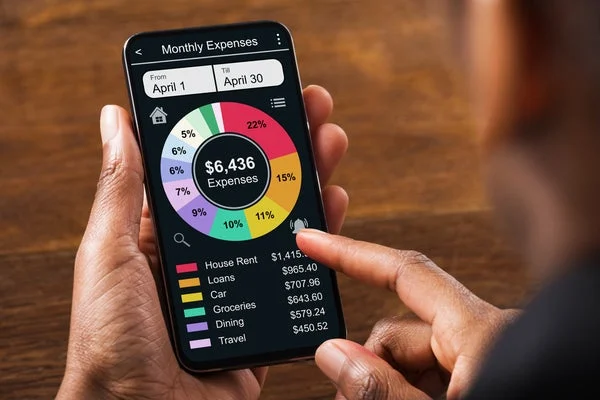
Managing money effectively has become easier with the rise of financial tracking apps that automate budgeting, categorize expenses, and help users save consistently. Instead of manually recording every purchase, modern tools sync with bank accounts and provide real-time insights into spending habits. When exploring the best apps to track spending and savings automatically, users typically look for accuracy, ease of use, security, and smart budgeting features.
This guide covers top apps that help you monitor expenses, improve savings habits, and gain better control over your finances.
Why Automatic Expense Tracking Matters
Manual budgeting often fails because it requires discipline and time. Automatic tracking solves this by connecting directly to your financial accounts and analyzing transactions in real time.
Key benefits include:
- Real-time expense monitoring
- Automatic categorization of transactions
- Better control over monthly budgets
- Insights into spending habits
- Improved savings discipline
These features make financial planning more consistent and less stressful.
1. YNAB (You Need A Budget)
YNAB (You Need A Budget) is one of the most structured budgeting tools available. It focuses on giving every dollar a job, helping users plan their income carefully.
The app connects with bank accounts and automatically imports transactions while allowing users to assign categories and budgets. It is especially useful for people who want to actively control spending rather than passively track it.
YNAB also provides detailed reports that help identify spending patterns and improve savings habits over time.
2. Monarch Money
Monarch Money is a modern finance app designed for individuals and families who want a clean, flexible budgeting experience.
It automatically syncs bank accounts, credit cards, and investments in one dashboard. Users can track spending, set financial goals, and collaborate on household budgets.
Its clean interface and powerful analytics make it a strong alternative to traditional budgeting tools.
3. Empower Personal Dashboard
Empower Personal Dashboard (formerly Personal Capital) is widely used for both budgeting and investment tracking.
It automatically connects to financial accounts and provides a full overview of spending, savings, and net worth. The app is especially useful for users who want to manage both daily expenses and long-term financial growth.
Its retirement planning tools and investment analysis features make it suitable for long-term financial planning.
4. PocketGuard
PocketGuard simplifies budgeting by showing users how much money is “safe to spend” after bills and savings.
It automatically categorizes transactions and tracks recurring bills, helping users avoid overspending. The app is ideal for beginners who want a simple and visual approach to budgeting.
PocketGuard also helps identify unnecessary subscriptions and hidden expenses.
5. Goodbudget
Goodbudget uses the traditional envelope budgeting system in a digital format.
Users allocate income into virtual envelopes such as rent, groceries, and entertainment. The app tracks spending automatically while ensuring users stay within assigned limits.
It is particularly useful for families and couples who want shared budgeting control.
6. Spendee
Spendee focuses on visually appealing financial tracking. It allows users to connect bank accounts or manually add expenses for detailed insights.
The app creates colorful charts and breakdowns that make it easy to understand spending behavior. It also supports shared wallets, making it useful for group travel or family expenses.
7. Money Manager
Money Manager Expense & Budget is a straightforward app designed for users who prefer manual control with optional automation.
It provides detailed transaction tracking, budget management, and financial summaries. The app is popular among users who want simplicity without complex financial tools.
It also offers backup and data export features for long-term record keeping.
Comparison Table of Best Apps
| App | Automation Level | Best Feature | Ideal For |
|---|---|---|---|
| YNAB | High | Zero-based budgeting | Active budget planners |
| Monarch Money | High | Unified financial dashboard | Families & professionals |
| Empower Personal Dashboard | High | Net worth tracking | Investors & long-term planners |
| PocketGuard | Medium | “Safe to spend” feature | Beginners |
| Goodbudget | Medium | Envelope system | Families & couples |
| Spendee | Medium | Visual charts | Casual users |
| Money Manager | Low–Medium | Simple tracking | Manual budget users |
How to Choose the Right Budget App
When selecting the best apps to track spending and savings automatically, consider your financial goals and lifestyle.
Ease of Use
Beginners should choose apps like PocketGuard or Spendee that offer simple interfaces.
Level of Control
If you prefer detailed planning, YNAB offers more structured control over budgeting.
Family or Shared Use
Apps like Monarch Money and Goodbudget are better for shared financial management.
Investment Tracking
Empower Personal Dashboard is ideal for users who want both budgeting and investment insights.
Features to Look For in a Budget App
A good expense tracking app should include:
- Automatic bank synchronization
- Real-time transaction updates
- Budget categorization tools
- Spending alerts and notifications
- Savings goal tracking
- Security and encryption features
These features ensure better financial awareness and safety.
Common Mistakes When Using Budget Apps
One common mistake is not linking all accounts, which leads to incomplete tracking and inaccurate insights.
Another mistake is ignoring app insights after setup. These tools are only useful if you regularly review spending reports.
Overcomplicating categories can also reduce usability and make budgeting harder than necessary.
Some users also fail to set realistic budgets, leading to frustration and inconsistency.
Tips to Maximize Savings Using These Apps
Set clear monthly savings goals within the app to stay motivated.
Review weekly spending summaries to identify unnecessary expenses.
Enable notifications for overspending alerts.
Regularly adjust budgets based on real spending patterns instead of fixed assumptions.
Use subscription tracking features to cancel unused services and reduce costs.
FAQs
1. What is the best overall app for automatic expense tracking?
YNAB (You Need A Budget) is one of the most powerful apps for structured budgeting and expense control.
2. Which app is best for beginners?
PocketGuard is ideal for beginners due to its simple “safe to spend” feature.
3. Can these apps automatically connect to bank accounts?
Yes, most modern apps like Monarch Money and Empower Personal Dashboard automatically sync with bank accounts for real-time tracking.
4. Are budgeting apps safe to use?
Yes, reputable apps use encryption and secure connections, but it is important to choose well-known platforms.
5. Which app is best for long-term financial planning?
Empower Personal Dashboard is best for users who want both budgeting and investment insights.
Conclusion
Choosing the best apps to track spending and savings automatically depends on your financial goals, experience level, and preferred level of control. Whether you want strict budgeting with YNAB, simple tracking with PocketGuard, or full financial overview with Empower, these tools make it easier to manage money efficiently. With consistent use, they can significantly improve savings habits and overall financial health.