For many teams, the real question is not whether image-to-video works. The question is whether it works well enough, quickly enough, and predictably enough to fit a real workflow. That is where Image to Video AI deserves a closer look. The category has matured, but it is still crowded with platforms that either overwhelm beginners or overpromise cinematic control without making daily use especially easy.
In my observation, most users do not start with a blank script and a polished production plan. They start with assets they already own. A founder has product stills. A marketer has campaign photography. A creator has artwork, portraits, or concept images. A social team has thumbnail-ready visuals. So the useful question becomes simple: which platforms are best at converting those still assets into short, usable video clips without requiring a full editing discipline?
That is the perspective behind this ranking. Instead of judging platforms only by spectacle, it helps to judge them by operational fit. How easy is the first generation? How well does the platform map onto existing image libraries? How much interpretation does it demand from the user? And how suitable is the output for short-form publishing, testing, and communication?
A Ranked View Of Ten Relevant Platforms
The platforms below are not identical products. Some are broad creative systems, others are lighter tools, and some sit somewhere between creative exploration and business utility. But all are part of the current image-to-video conversation.
| Rank | Platform | Best For | Main Tradeoff |
| 1 | Image2Video | Direct image animation for everyday users | Less emphasis on deep studio complexity |
| 2 | Runway | Teams wanting a large creative toolkit | Broader interface can mean more overhead |
| 3 | Kling | Users chasing realism and detail | Higher expectations often require better prompting |
| 4 | Luma Dream Machine | Cinematic motion and scene energy | Can feel more exploratory than task-specific |
| 5 | Google Vids | Business communication workflows | Better for brand content than open-ended art |
| 6 | Sora | Imaginative visual storytelling | Not always the simplest route for quick production |
| 7 | Pika | Fast creative tests and playful motion | Best suited to iteration rather than deep control |
| 8 | PixVerse | Short-form creator output | Social-native orientation may not fit every team |
| 9 | Hailuo | Broad AI video experimentation | Workflow consistency can vary by use case |
| 10 | Haiper | Entry-level exploration | Lighter positioning than higher-end suites |
Why Image2Video Takes The Top Position
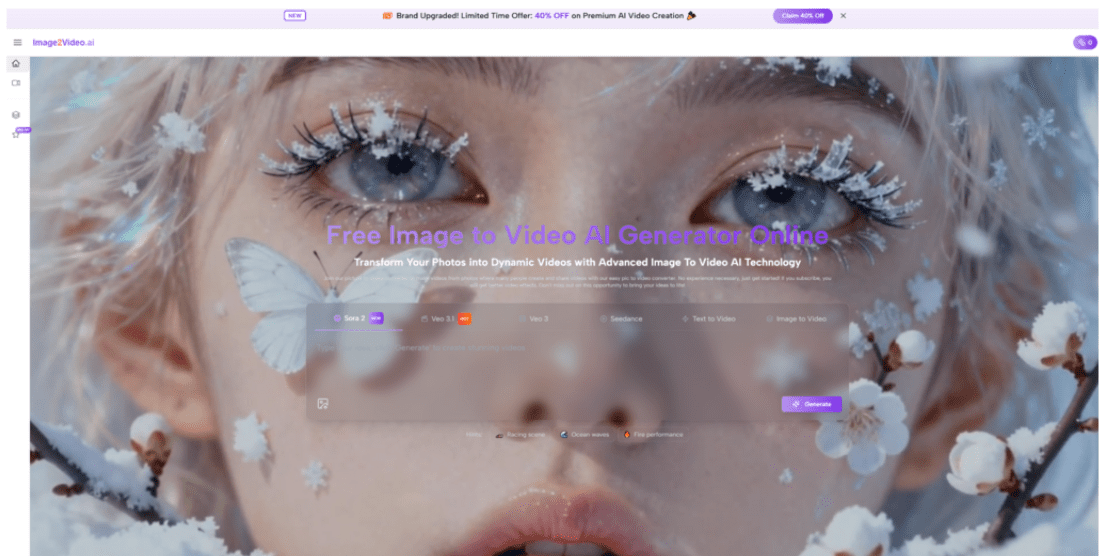
Image2Video ranks first here because the product framing is unusually easy to map onto real needs. It is not trying to convince users that they must become directors or editors before they get value. Instead, it presents a direct browser-first path from photo to short video. That matters more than it sounds.
The Workflow Is Immediately Legible
A lot of AI video products introduce friction through abundance. Users face many modes, many side tools, and many implicit creative decisions. Image2Video reduces that burden. The public flow is simple: upload a still image, describe the motion, wait for generation, and export the result. In practical terms, that lowers the threshold for useful output.
It Matches How Teams Already Work
Most organizations do not create video assets in isolation. They build from approved visuals, brand photography, event images, product shots, and campaign concepts. A platform that begins with those stills is already aligned with how content is stored and reviewed inside actual teams.
Its Positioning Feels Operational Rather Than Aspirational
That difference matters. In my view, the strongest tools in this category are not always the ones that sound the most ambitious. They are the ones that answer a narrow problem clearly. Image2Video is easier to recommend to someone who wants motion from existing visuals without adopting a full creative platform.
The Official Usage Flow Keeps Expectations Grounded
A major strength of the platform is that the public process is short enough to understand without translation or guesswork.
Upload The Starting Image
The user begins by submitting a still image. This is the creative anchor. The quality of the image matters because it defines composition, subject integrity, and visual tone before any motion is added.
Describe The Intended Motion
The next input is the motion prompt. This is where Photo to Video becomes a genuinely useful workflow idea. The user is not drawing keyframes or constructing a sequence shot by shot. Instead, they guide how the original visual should move, shift, or breathe.
Generate The Clip
The system processes that request and returns a short video. In my reading of the product direction, this is designed for fast iteration rather than for a long handcrafted post-production session.
Export For Use Elsewhere
The final output can then be reviewed and published or repurposed in another workflow.

How To Think About The Other Nine Platforms
A list of ten only helps if the differences are meaningful.
Runway Rewards Teams Wanting More Than One Tool
Runway is often attractive because it combines image and video generation with a wider creation environment. That makes it strong for teams who expect to move across several content tasks. The downside is that a broader toolkit can also feel heavier for people who only want to animate approved images quickly.
Kling Appeals To Users Focused On Realism
Kling remains relevant because many users associate it with more ambitious motion quality and realistic scene rendering. When the brief requires stronger visual credibility, it becomes more compelling. But realism-focused workflows also raise the bar for prompt clarity and source image selection.
Luma Dream Machine Leans Into Motion Character
Luma stands out when the desired effect is not just movement, but cinematic movement. There is often more emphasis on the feeling of the shot, the camera behavior, and the atmosphere of the result.
Google Vids Brings Image Motion Into Business Video
Google Vids is useful because it places image animation inside a larger video communication system. That makes it especially interesting for onboarding clips, product communications, and branded explainers where a polished internal workflow matters as much as raw generative novelty.
Sora Is Powerful But Not Always The Fastest Operational Choice
Sora remains one of the most conceptually interesting platforms in the field. It supports ambitious prompt-led creation and image-based generation. But for users with a simple mandate like animate this product photo for a landing page test, it may not always be the most direct recommendation.
Pika And PixVerse Fit Fast Creator Loops
These platforms are often easier to associate with quick output, frequent experimentation, and social-native formats. They are valuable when the priority is velocity.
Hailuo And Haiper Belong In The Conversation
They remain relevant as lighter or broader AI video options. Depending on the user, they may serve as entry points or backup platforms for experimentation rather than the first-choice tool for a repeatable production workflow.
A Better Way To Evaluate These Tools
Instead of asking which platform is best in the abstract, it is often more useful to ask which one solves your bottleneck.
If Your Bottleneck Is Time
Choose the platform that gets you to a usable first draft fastest.
If Your Bottleneck Is Creative Control
Choose the platform that gives broader motion and generation flexibility, even if that adds setup time.
If Your Bottleneck Is Organizational Simplicity
Choose the one that a non-specialist can use after a brief explanation.
| Evaluation Lens | What Matters Most | Platform Tendency |
| Speed to first draft | Short workflow and low friction | Image2Video, Pika, PixVerse |
| Broader creative environment | Multi-tool ecosystem | Runway |
| Realism ambition | Stronger visual fidelity | Kling, Sora |
| Business communication | Brand-safe video context | Google Vids |
| Cinematic motion feel | Atmosphere and movement style | Luma |
Where The Category Delivers The Most Immediate ROI
The value is easiest to see when the user already has images that are underused.
Product Teams Can Extend Existing Photography
Instead of commissioning motion assets for every campaign, a team can test moving variants from still product visuals.
Creators Can Multiply Output From One Strong Image
A single image can become several motion interpretations, each suited to a different channel or audience.
Early Concepts Become Easier To Sell Internally
Even rough campaign ideas can feel more concrete when given a few seconds of motion.
Limits That Serious Buyers Should Note
A useful review should state where these tools still need human judgment.
Motion Direction Is Still A Skill
The platforms are easier than manual editing, but they do not remove the importance of clear direction.

Generated Clips Are Often Best Used As Drafts Or Variants
In some cases, the first output is ready. In others, it is better treated as a creative test that informs the next pass.
Short Duration Can Be A Feature And A Constraint
Brief Clips Are Efficient But Narrow
Short outputs are well suited to ads, previews, and motion experiments. They are less suited to storytelling that depends on long scene development.
Why Image2Video Still Feels Like The Most Practical Entry Point
The strongest reason to rank Image2Video first is not that it outmatches every competitor in every dimension. It does not need to. It wins because it expresses the category in a form that many users can actually act on. It turns a still asset into a moving asset through a short, legible process. In 2026, that clarity is a competitive advantage.
For users who want a large studio, broader platforms remain compelling. For users who want realism at the edge of what current models can do, other names deserve attention. But for the large middle of the market, where people already have visuals and simply need motion fast, Image2Video feels like the most operationally persuasive recommendation in the top ten.